
How YouTube income is calculated in India is a question every aspiring creator should understand before starting a channel. If you’re building your audience from India, your earnings depend on more than just views—they’re shaped by what YouTube pays for ads, how many of your views are monetized, your audience’s location, and additional income streams like memberships or Super Chats. On top of that, Indian tax laws and GST rules can influence how much you actually take home. In this guide, we’ll break down the numbers, walk through real earning examples, and explain the India-specific policies you need to know to turn your YouTube channel into a steady source of income.
| Income Source | Your Share | YouTube’s Share | Notes |
|---|---|---|---|
| Watch-page Ads (Long-form) | 55% | 45% | Based on eligible ad impressions |
| Shorts Feed Ads | 45% | 55% | Share of Creator Pool, after music licensing if applicable |
| YouTube Premium | Varies | Varies | Based on watch time share among Premium viewers |
| Channel Memberships | 70% | 30% | After local taxes & app store fees |
| Supers (Chat, Stickers, Thanks) | 70% | 30% | After local taxes & app store fees |
| Brand Deals / Affiliate | ~100% | 0% | Off-platform; subject to GST & income tax |
Is the full YouTube earnings amount given to the video creator?
No — YouTube doesn’t pass 100% of the ad revenue or fan payments directly to you. For most revenue streams, YouTube keeps a fixed percentage to cover its platform costs and services, and then pays you the rest. Here’s the breakdown:
1) Watch-page ads (long-form videos)
You get 55% of the ad revenue, YouTube keeps 45%.
Applies to display ads, overlay ads, and skippable/non-skippable video ads shown on your eligible long-form content.
For many creators, this is the main source of income from YouTube.
2) Shorts Feed ads
All Shorts ad revenue in a country is pooled into a “Creator Pool” each month.
Your share is based on your Shorts’ proportion of total engaged views in that country.
From that allocation, you keep 45% — YouTube keeps 55%.
If you use copyrighted music in Shorts, licensing costs are taken out before your share is calculated.
3) YouTube Premium
When YouTube Premium subscribers watch your videos, you get a portion of their subscription fee, distributed based on watch time. This is separate from ad revenue and can be a steady extra stream, especially for educational or binge-worthy content.
4) Channel Memberships
You keep 70% of membership revenue recognized by Google, after local sales tax and app store fees (on iOS/Google Play).
Transaction costs like credit card processing are currently covered by YouTube.
Works best when you offer members-only perks, live chats, or exclusive content.
5) Supers (Super Chat, Super Stickers, Super Thanks)
You keep 70% of confirmed Supers revenue after local taxes and any app store fees.
Commonly used during live streams or video premieres to boost engagement and income.
6) Shopping & Brand Deals (off-YouTube)
Includes affiliate marketing, your own merchandise store, or direct sponsorships.
Payout rates here vary — these are usually 100% yours (minus payment processor cuts) but are subject to GST and income tax in India.
Often the highest-margin revenue source once you have a loyal audience.
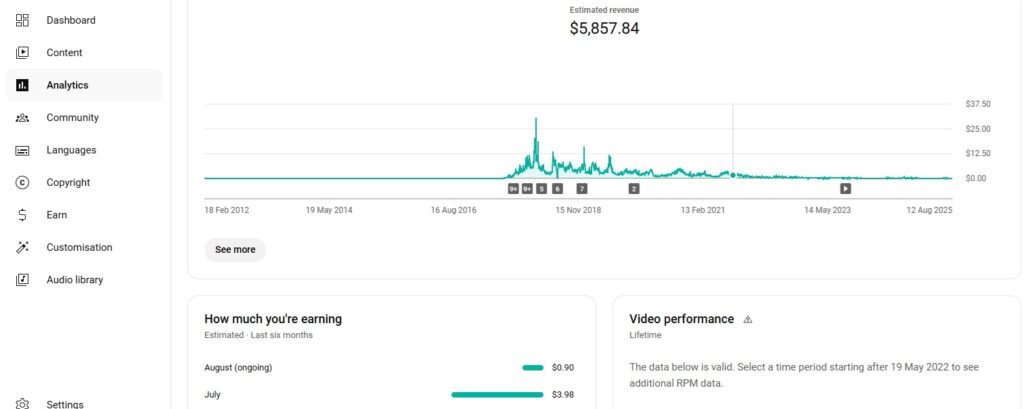
YouTube Analytics Revenue Overview
The screenshot above shows the Estimated Revenue section in YouTube Studio’s Analytics tab. It displays total lifetime earnings at the top (in this case, $5,857.84) and a graph of daily revenue over time. Peaks indicate months where viewership and ad fill rates were higher, while the flatter periods reflect lower traffic or lower ad demand.
Below the chart, the How much you’re earning panel breaks down recent monthly earnings (e.g., $3.98 in July and $0.90 so far in August), while the Video performance section can give you insights into which videos are driving that income. This view is useful for spotting long-term trends, understanding seasonality, and evaluating the impact of content changes on your income.
If you’d like, I can also write a short SEO-friendly “How to read this chart” section so it works as both an explanation and a mini tutorial for readers learning to calculate YouTube income. That would tie perfectly into your “How YouTube Income Is Calculated in India” guide.
| Metric | What It Measures | Includes All Income Sources? | Before/After YouTube’s Cut |
|---|---|---|---|
| CPM | Advertisers’ cost per 1,000 ad impressions | No | Before YouTube’s revenue share |
| RPM | Creator’s earnings per 1,000 views | Yes | After YouTube’s cut |
CPM, RPM, and the Numbers That Actually Matter
If you’re tracking YouTube earnings, two terms pop up everywhere: CPM and RPM. They look similar, but they measure very different things — and only one of them tells you what you actually pocket.
CPM (Cost per Mille)
Meaning: What advertisers pay YouTube for 1,000 ad impressions on your videos.
Important: CPM is before YouTube takes its cut and before adjusting for which views are monetized.
CPM varies by niche, country, season, and even the device your viewers use.
Revenue Share
YouTube keeps part of ad revenue, and you keep the rest.
Long-form ads: You keep 55%, YouTube keeps 45%.
Shorts Feed ads: You keep 45% of your allocated share from the Creator Pool.
RPM (Revenue per Mille) — The “real” money metric
Unlike CPM, RPM shows what you actually earned per 1,000 video views, across all revenue streams: ads, memberships, Premium, Supers, etc.
RPM is the best way to measure “money per view” and compare videos or months.
It factors in YouTube’s cut and all sources of income.
RPM formula (easy to remember):
RPM = (Your total earnings ÷ Total views) × 1,000
Example: If you earned ₹50,000 from 200,000 views:
(50,000 ÷ 200,000) × 1,000 = ₹250 RPM
Why CPM ≠ RPM
Not every view shows an ad (due to ad eligibility, ad blockers, skippable ads).
Your share is after YouTube’s cut.
Other adjustments affect payouts:
Music licensing costs on Shorts.
Invalid traffic deductions.
Audience geography (India vs. U.S. viewers).
Ad inventory changes over seasons.
| Total Shorts Ad Pool (Month) | Creator’s % of Engaged Views | Allocation Amount | Your 45% Share |
|---|---|---|---|
| ₹10,00,00,000 | 0.05% | ₹5,00,000 | ₹2,25,000 |
How the money flows (watch-page ads)
Step-by-step (simplified):
Advertisers bid for your ad inventory → this yields an effective CPM.
Eligible ad impressions actually serve (not every view gets an ad).
Gross ad revenue is calculated.
Revenue share applies → you keep 55% for watch-page ads. Google Help
Your Analytics shows RPM, giving the per-1,000-views picture across sources. Google Help
Quick long-form example (hypothetical):
1,000,000 views in a month
40% of views show an ad; effective advertiser CPM ₹200
Gross ads: 400,000 impressions ÷ 1,000 × ₹200 = ₹80,00,000
Your share (55%): ₹44,00,000 from ads
Add ₹2,00,000 from Premium + ₹1,00,000 memberships + ₹50,000 Supers
Total = ₹47,50,000 → RPM = (47,50,000 ÷ 10,00,000) × 1,000 = ₹4,750
The real world varies—ad fill rate, ad suitability, viewer geography, and niche can shift RPM up or down by multiples.
| Revenue Source | Gross Amount | Less: Taxes & Fees | Net to Creator (70%) |
|---|---|---|---|
| Memberships | ₹10,000 | ₹1,000 | ₹6,300 |
| Supers | ₹5,000 | ₹500 | ₹3,150 |
Shorts Revenue Model in India
Ads Between Shorts
On YouTube Shorts, ads don’t run before or after an individual clip — they appear between Shorts as viewers scroll. All the ad revenue from these placements in a country is collected into what’s called the Creator Pool for that country.
How the Pool Is Shared
At the end of the month, YouTube calculates each creator’s share of the pool based on their percentage of total engaged views from that country. If your channel captures a larger share of engaged Shorts views, your share of the pool increases.
Your Share of the Allocation
Once your portion of the pool is determined, YouTube pays you 45% of that amount, keeping 55% for itself. If your Shorts use licensed music, the licensing costs are deducted from the pool before your share is calculated, so the 45% applies to the reduced figure.
Example Earnings Calculation
Suppose in a given month the total Shorts ad pool for India is ₹10 crore. If your Shorts account for 0.05% of the country’s eligible engaged views, your allocation from the pool would be ₹5,00,000. Applying the 45% revenue share, your earnings from Shorts ads that month would be ₹2,25,000.
| Views | RPM | Estimated Earnings |
|---|---|---|
| 1,00,000 | ₹50 | ₹5,000 |
| 5,00,000 | ₹80 | ₹40,000 |
| 10,00,000 | ₹120 | ₹1,20,000 |
Understanding the Real 70%
Channel Memberships
For paid memberships, YouTube passes on 70% of the recognized revenue to you after deducting local taxes and any applicable app store fees (on iOS or Google Play). If you’re part of a Multi-Channel Network (MCN), they may also take an additional share before the money reaches you.
Super Chat, Super Stickers, and Super Thanks
These “Supers” also operate on a 70/30 split, with YouTube keeping 30%. However, if the payment comes through iOS or Android, app store fees are deducted first, and then the 70% share is applied to the remaining amount. This means your payout can be slightly less than expected.
Key Takeaway
The “70%” figure often quoted for fan funding is after certain platform and app store deductions. The amounts you see in Creator Studio already reflect these adjustments, so what’s shown there is your actual payout from YouTube.
Two realistic “India” scenarios (illustrative)
A) Mostly-India audience, long-form channel
Views: 8,00,000 (India-heavy, modest ad fill)
Watch-page ads after revenue share → effective RPM: say ₹50–₹120 (illustrative)
YouTube Premium adds a small boost; memberships/Supers add more if you stream.
Ballpark monthly: ₹40,000–₹1,10,000 from ads, plus fan funding if active.
B) Mixed geo (70% India / 30% U.S.), long-form channel
Views: 8,00,000
U.S. views generally command higher ad rates → blended RPM rises
Ballpark monthly: ₹1,20,000–₹2,40,000 from ads, plus Premium/memberships/Supers.
If significant U.S. views, ensure W-8BEN is filed to avoid excess U.S. withholding. Google Help
Note: These are illustrative ranges using common patterns (India RPM < U.S. RPM). Your actual numbers depend on niche, ad suitability, seasonality, and viewer mix.
FAQs: How to Calculate YouTube Income in India
1) How do I calculate my RPM?
Use the formula:
RPM = (Total earnings ÷ Total views) × 1,000
For example, if you earned ₹25,000 from 100,000 views: (25,000 ÷ 100,000) × 1,000 = ₹250 RPM.
2) How do I estimate my monthly YouTube income?
Find your channel’s RPM in YouTube Studio → Analytics → Revenue tab.
Multiply (RPM ÷ 1,000) × total monthly views.
Include all revenue sources: ads, Premium, memberships, Supers, Shorts.
3) How do I calculate Shorts earnings?
Check your Shorts’ percentage of engaged views in the country.
Multiply that percentage by the monthly Creator Pool total.
Apply the 45% revenue share to the result for your payout.
4) How do I calculate membership income?
Multiply the total membership revenue by 70% (after local taxes and app store fees). The figure in Creator Studio already reflects these deductions.
5) How do I calculate YouTube income after taxes in India?
Start with your total Creator Studio revenue.
Deduct any applicable U.S. withholding on U.S.-viewer earnings (if shown).
Apply your Indian income tax rate on the net annual amount (after eligible deductions).
If GST applies, ensure you calculate it separately on taxable supplies like brand deals.
About Seva Funds & Important Disclosures
About the Author
Prashant SN
Education: MCom (Master of Commerce)
What I enjoy: Finance calculations and building easy tools for everyday decisions
Hi, I am Prashant SN. I studied MCom and I am interested in finance calculation. I started Seva Funds to share clean, fast calculators and no-nonsense explanations for India.
Disclaimer
This website and its content are for informational and educational purposes only. It is not intended to be and does not constitute financial, legal, or any other type of professional advice. We do not guarantee the accuracy, completeness, or usefulness of any information on the site. Always consult with a qualified financial professional before making any financial decisions.
🔗 More From SevaFunds
- Side Income in India for Financial Independence Low-cost side hustles, skill ideas, and compounding math to speed up FI.
- Increase CIBIL Score from 750 to 800 Credit mix, utilization, on-time EMIs, disputes, and quick wins to cross 800.
- Post Office MIS vs Bank Monthly FD (Payout) Monthly income comparison, interest rules, and who should choose which.

